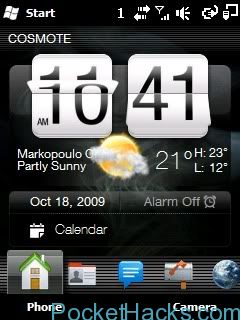
Aero style theme for WM6.5
If you like the Windows 7 Aero interface, this theme is for you, works on every WM6.5.x device. All resolutions supported. Aero-like taskbar, bordered menus and other Windows 7 elements.…
Do you have Windows Mobile 5 or 6 phone? If you have one and thinks that it’s already an outdated device, get your words back now and take a look at this post 🙂 Windows Mobile is amazing mobile OS, full of apps, games and tweaks, you can do what you want on your phone, but it’s officially dead OS and it was replaced by Windows Phone 7, which is completely different platform. Now, since is only “officially dead” doesn’t mean that this is the end, not of course, all you need is some fresh ROM for your device and the latest apps!
Let’s “pimp your phone” – first, take a look at our WM6.5 ROMS section and search for the latest custom ROM that is ported for your device, read the instructions and flash it, if there is no WM6.5 for you, don’t worry, just search over the XDA-Developers forum. Anyway, you can use the latest Windows Mobile apps on almost every OS version and device.
Samsung B7320 custom ROM WM6.5.3 build 23121 Flash at your own risk, read the manual first! Download
How to install: 1. Make sure your device has an OS version like Windows Mobile 6.5.5 or anything like that. It will not work on WM6.5 the one without the…

3VOLUTION SERIES of Smartphone ROMS for HTC S620 (T-Mobile Dash / HTC Excalibur) will give all new life to your older devices.
Included in the ROM (3VO.3.50.033010):
Features:

Programs and Applications:
WM6.5 build 23016 custom ROM for HTC Touch Cruise (HTC Polaris): Memory: free memory for "Program" after first boot 54mb and for "Storage" about 90mb (with Manila2D enabled). To avoid…
3 version of the theme available for WM6.5.x (WVGA-VGA-QVGA) GFX: first version of the theme. GFX DARK: same as GFX but with softkeybar a taskbar in dark gray for all…
Notes:
1. All surveys were made on the basis of the TMN Silverbelt firmware B08 and ChinaUnicom ZTE-W x60 firmware B02.
2. If your device bricked, you can try to flash it by original flashers (B05 or B08). I’ve flashed my ZTE Raise hundreds of times – bootloader still alive.
3. ZTE Raise (ZTE-W x60) is differs from TMN Silverbelt by hardware. ZTE Raise have 3.2mpx back camera without flash, front camera for videocalls and have no WIFI. TMN Silverbelt have WIFI, 5.0mpx back camera with flash and have no front camera. ZTE-W x60 is made for ChinaUnicom, and Silverbelt – for Portuguese TMN. You should understand that I have ZTE-W x60. So I can’t test TMN camera and WIFI.
WARNING:
1. Before you flash this ROM, make sure you know how to recover from a non-booting ROM or to original ROM!
2. I accept no responsibility for bricked or network-locked devices or any other problems!
3. Please, read instruction in downloaded package and post below.
4. I strongly recommend first flash phone with TMN’s B08 firmware before using this firmware.
5. After every flashing you MUST perform a hard reset!
Original thread and info – click here.
Here is a simple app to create shortcuts to items inside the Control Panel. On Windows Mobile 6.1 it was quite easy to create link to items such as "Remove…