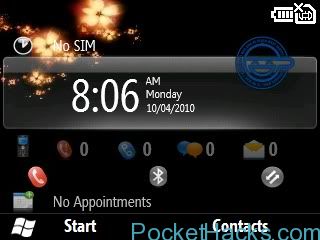

This ROM is only for SAMSUNG SGH-i617
This is also the latest custom Windows Mobile 6.5 ROM for SGH-i617.
Ho-to flash instructions:
*NOTE THIS STEP NEED ONLY BE DONE ONCE, TO LOAD THE DRIVERS* – Disable USB Connectivity in ActiveSync under File – Connections, MAKE SURE you have the modem/flash drivers installed. (Connect phone in modem mode by settings -> connections -> usb -> modem, install drivers). Do not forget to close wcescomm.exe and wcesmgr.exe for Activesync. by using [Tools]ActivesyncKiller.exe
1.) Boot up device in flashing mode by holding down right soft key, “camera” button located on right side of phone, and power simultaneously.
2.) Run included program “I600_v1.1_Single.exe”
3.) Connect device to computer. Yellow color in program should change color.
4.) Click “PDA” button. Choose included file “ZN520_[SGH-i607]WM6.5_21854_20091022_MSYH.bin”
5.) Check Phone Initialization(EFS Clear). Make sure EFS CLEAR and PDA are the only one checked
5.) Click “Start Download”
6.) When device shows “Phase 2 ——- [PASS]” Flash is done. It should auto-reboot quickly.
7.) First boot will be slow so be patient.
1.) Boot up device in flashing mode by holding down right soft key, “camera” button located on right side of phone, and power simultaneously.
2.) Run included program “I600_v1.1_Single.exe”
3.) Connect device to computer. Yellow color in program should change color.
4.) Click “PDA” button. Choose included file “ZN520_[SGH-i607]WM6.5_21854_20091022_MSYH.bin”
5.) Check Phone Initialization(EFS Clear). Make sure EFS CLEAR and PDA are the only one checked
5.) Click “Start Download”
6.) When device shows “Phase 2 ——- [PASS]” Flash is done. It should auto-reboot quickly.
7.) First boot will be slow so be patient.

men, i love you! really really! thanks!! 😀
i am a little nervous as how to epgrade my sgh i617
will something go wrong
Hi kenroy, read the instructions and everything will be perfect 🙂