How to cook your HTC (real Pocket PC desoldering)
Watch how to cook (for real) O2 XDA Orbit (HTC P3300/Artemis) - don't try this at home :P And finally - sexy naked board: Click on the picture for zoom…
0 Comments
September 9, 2008
Pocket PC Mods
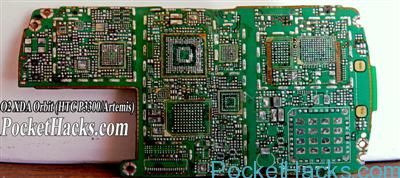
Watch how to cook (for real) O2 XDA Orbit (HTC P3300/Artemis) - don't try this at home :P And finally - sexy naked board: Click on the picture for zoom…
With the help of Mamaich and some others (please add all i have forgotten), the Universal can now have 128 MB of Ram instead of 64 MB. This procedure involves hardware modification! Do it at your own risk! These are the steps that are needed to accomplish the ultimative goal of having 128 MB Ram:
This is an update to the previous information that was here but a little out of date. This procedure is how to upgrade your Universal from 64Mb to 128Mb by removing the two 32Mb M-RAM chips and replacing them with two 64Mb M-RAM chips. This is a complex procedure and requires some specialist equipment to do the job. You will need the following equipment to do the job properly.
First thing is to get hold of two of the 64Mb M-RAM chips.
What you need are Infineon HYB25L512160AC -7.5 (2 pcs – 512MBit each)
Chips harvested from the BlueAngel are confirmed to work.
These chips are 54-ball BGA’s (Ball Grid Array) devices, which means that they have little solder balls (0.4 mm) on the bottom and cannot be soldered using a conventional soldering iron. It is also worth mentioning that these chips are moisture sensitive and must be stored in dry conditions preferable in dry-pack sealed packaging. If they get damp there is a chance that they will “Pop-corn” during the soldering process. i.e. the moisture will turn to steam and split open the chips.

This guide will show you how to successfully install a 100GB Toshiba hard drive.

1) Follow the disassemble guide until the back cover on the Shift is removed.
2) Carefully pull back the tape found on the ribbon cable connecting to the hard drive.
3) Pull gently the ribbon cable that connects to the hard drive interface. I used pliers with electrical tape around the pinchers to not scuff/scratch the ribbon cable. The hard drive connector is of LIF type (Low Insertion Force) meaning it’s on there simply by pressure and not secured by any clips. It should slide out easily. (more…)

Let’s started to look at hacking together a headphone adapter for the SPV M3100. I have just finished my headphones adapter hack and thought I would share the procedure with you.

 If you’re on a tight budget or have some free time on your hands, you can make your own PDA screen protector. Here’s how.
Most users will either have a leather or hard case that protects their PDA’s screen when this is not in use. However, it makes sense to protect the display while you’re using it as well. For example, instead of using your stylus to write on your PDA, you may accidently pick up a ballpoint pen, and the result will probably be a scratched screen. Prolonged use can also wear out the display, particular in the screen area where you enter your data.
Protecting your LCD means you don’t have to worry about scratches or wear-and-tear. Additionally, screen protectors provide “drag” on the display, thus improving handwriting recognition.
(more…)
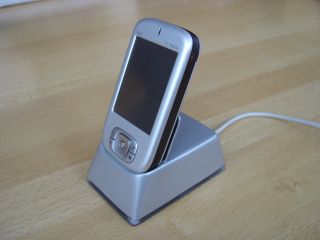
How-to tutorial for DIY mini USB docking station with LED’s. The author of this guide uses a HTC Prophet, but you can make it for almost any Pocket PC with mini USB connector.
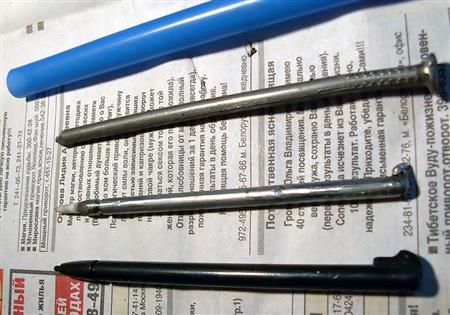
There is no need to explain, one nail = one stylus. Of course you need some skills to create it 🙂

Asus P535, HP iPAQ hx4700 and HTC Blueangel (Qtek 9090) custom paint jobs, from 4pda.ru users :)
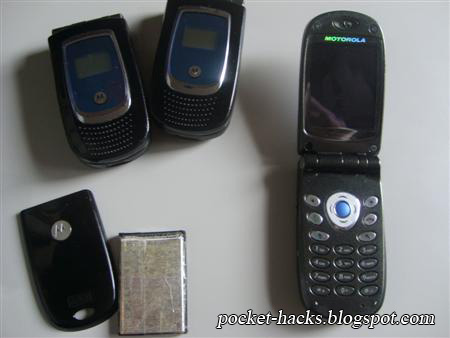
If you have a MPx200, should to know that the sound with headphones is not pretty good, the bass is missing and the volume power is not much. Here I have a mod solution that makes the phone sounds better then MP3 player 🙂

What you need:


