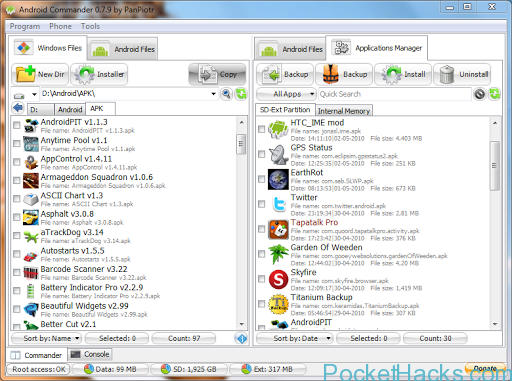

Android Commander is windows application to keep control on your Android apps and files from PC. This is a small, very very fast and intuitive app.
Explore files:
– copy multiple files/dirs between Phone and PC
– copy multiple files/dirs between Phone folders
– delete multiple files/dirs from Phone
– new dir and rename options
– drag&drop multiple files/dirs in to progrm
– drag&drop files/dirs between program tabs
– partitions size info
– bookmarks
Manage apps:
– windows integration
– backup multiple apps to any dir on Phone/PC
– batch/single apps install
– install as private
– update
– batch/single uinstall apps
– uninstall with option to keep data or not
Console:
– type any shell command
– run sh script from PC
and more…
– flashing zip and img files
– options to reboot, reboot to recovery, reboot to bootloader, power off phone
– screenshots (beta)
– tools…

I was looking something like this long time ago.
You deserve a beer from me!!! 😉
This one is the best file explorer for Android devices, you can find it for free @ Android marketplace from your phone 🙂
Its very nice and lite app 🙂