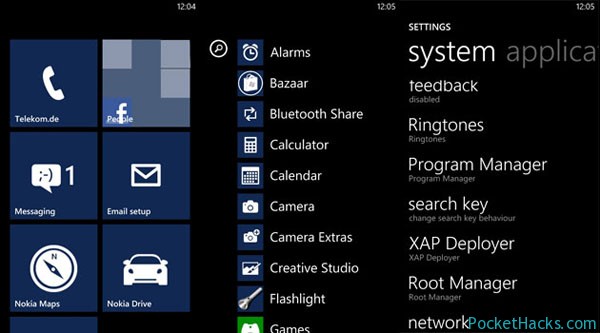
Here is the latest version of the most-popular Windows Phone 7.8 custom ROM for HTC HD2 – Pdaimatejam ROM v8.9 (OS 7.10.8862.144). It’s fully unlocked with XAP deployer, Registry Editor, HTC Voip, the latest versions of Nokia Drive and Nokia Maps and many new stuff added. Of course, the best of all is the improved battery life compared to all the other ROM’s currently available.
NOTE: You must have MAGLDR 1.13 installed to flash this ROM!
Custom ROM for Nokia Lumia 800 (RM-801) – FunkyROM Lite v1.0
Here is the new FunkyROM Lite v1.0 – a custom Windows Phone 7.8 ROM for Nokia Lumia 800 (RM-801), thanks to lordmaxey @XDA-Developers. It’s based on the latest basic Nokia ROM – RM-801 1750.823.8862.13110 and features all official languages.
Custom Windows Phone 7.8 ROM for Nokia Lumia 800 (RM-801)
What’s new:
Full CAB update support
Full Unlock v4
Root Manager
XAP Deployer
Customizable Search Key
WMDC
Bazaar
Nokia Bluetooth Share
USB-Video-Out
WP7 Root Tools 1.2
Note: you can flash this ROM only if you have a Nokia Lumia 800 with Qualcomm Bootloader!!!
Nokia already promised to provide some of their Windows Phone 8 apps for the first gen Nokia Lumia phones, and here we have the first two officially available - the…
If you have the latest Pdaimatejam Windows Phone 7.8 Rom v8.7 installed on your HTC HD2, there is a problem with the 3G data connection – it’s not working on some networks.
Here we have the official 3G fix from Pdaimatejam, it’s a .cab file so you need to use the Cab Sender:
Connect your HD2 to the PC (make sure Zune is not running)
Start the WP7 Update Cab Sender.bat file
On the Command Prompt screen press “S” to send the .cab file to your phone
Wait for the update, the phone will be restarted
Use the Connection Setup app (from HTC) or Network Setup (from Nokia) to set your connection, in most cases there is no need to enter APN, however if you still have problems just manually add the proper APN for your mobile operator.
Here is the latest Rataplan V5.0 custom ROM for Nokia Lumia 710 – Windows Phone 7.8, full unlock and 24 languages inside!
This ROM is based on the latest official Nokia firmware, OS version 7.10.8858.136 (Windows Phone 7.8) and it’s fully unlocked – native application support, selective root access for applications, root access usage notifications and enhanced security.
What’s new:
Full Unlock v4.0
CacheClearer
Camera extra’s
Bluetooth sharing
Ringtone maker
Tile World Clock
WPH Tweaks
Colors Start Menu
PDF Move
Volume Slider- added in Settings
Search Key- added in Settings
GSensor – added in Settings
Program Manager – added in Settings
Some registry changes
Visual Voice Mail for Orange France and Bouygues Telecom
Note – you need an unlocked bootloader on your Nokia Lumia 710 to flash this custom ROM, more info!
If you are still not getting the latest Windows Phone 7.8 update pushed to your device, here we have a step-by-step guide on how to manually force the update.
Windows Phone 7.8 Zune Update
The first Windows Phone 7.8 update method is through Zune:
Connect the phone to your PC and launch Zune.
Click on “Phone” > “Settings” > “Update” and allow the software to tell you is there any update available, if you are lucky the update process will be started, if not – proceed to the next step.
Force the update – click on another button in Zune, then click the “Update” button again and immediately disconnect your computer from the internet (pull out the LAN cable or disable your Wi-Fi), wait for a while and Zune should display a notification that an update is available for your phone.
Reconnect your PC to the internet and continue with the update process through Zune.
Note: Depending on what OS build you have installed, you may be prompted for several OS updates, the final build is 8858.
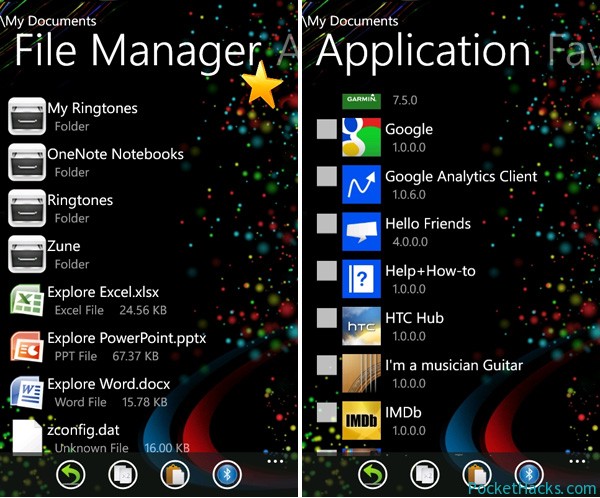
Unique File Manager is the first Windows Phone 7.x file manager with built-in “send via Bluetooth” support, the app uses DFT’s bluetooth driver and it must be installed and activated before you start the file manager.
Unique File Manager for Windows Phone 7.x
App features:
Send any file via Bluetooth
Run any file in Windows Phone 7 that’s located in the registry
Unique File Manager requires a fully unlocked custom ROM on your phone (dev + interop unlock) so if you are running on a stock one, check out the section for your device on XDA-Developers 😀