Atila – Motorola Alexander’s non-QWERTY version
Another leaked Motorola handset? You bet! This time we’ve got the brother-in-law to the Motorola Alexander — no QWERTY keyboard — with a pretty decent spec sheet. This one is…
Update doesn’t work at all / stops at 1%
Short answer: Your device is needs HardSPL. See links at bottom to get it, read on to understand the difference between Standard/Developer Edition!
Long answer:If your Diamond refuses to be updated completely, you’re probably missing HardSPL. The SPL is the device’s bootloader. It controls what can be flashed and what not. In order to flash anything not signed by HTC or your cell operator, you will need a “custom” version, called HardSPL.
There is two versions of HardSPL, the links are at the bottom, but please continue reading the next section before downloading.
Update stops at 0%
Short answer: You’re running the normal HardSPL and you’re trying to flash an unsigned (not signed by olinex) ROM. You need the developer version which fixes the 0% issue. Link is at the bottom of this post. Read on to understand the difference between Standard/Developer Edition!
Long answer: First you need to understand that there are two definitions of “signed”. HTC and the mobile operators sign ROMs so that the RUU flash utility allows them to be flashed. Usually this is what the word “signed” in the filename means.
Then there is another definition of signed: The developers of HardSPL introduced their own signing process. They want to ensure that people flashing cooked ROMs can rely on a certain quality standard. The normal version of HardSPL will only allow ROMs signed by OliNex to be flashed. If the ROM you are about to flash is signed, it will say so in the thread you got it from. If it isn’t signed, you will need the developer version of HardSPL. That one will allow any ROM to be flashed. Get it at the bottom of this posting.
A note on this: The signing process by olinex makes sure that the ROM you’re about to flash won’t brick your device. It doesn’t mean all other ROMs are necessarily evil.
Update stops at 5%/Invalid Model ID is displayed
Short answer: The model ID hardcoded in the ROM image doesn’t match the ID of your device. Read on for a fix.
Long answer: Don’t Panic. Your Device isn’t broken 
Each Diamond Model has it’s own ID. My German MDA Compact IV is a DIAM200. Other models are DIAM150/DIAM300/DIAM100….
Now ROMs might be configured to be flashable to a specific Model ID only, even though technically they would work fine on any Model ID.
In that case the ROM needs to be “reconfigured” – this process works for full ROMs as well as Radios.
HTC Touch chinese clone:
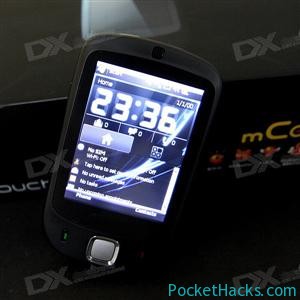
Specifications:
– Supports bluetooth, wireless lan (WLAN / Wifi)
Based on early rumors from BGR, the Motorola Alexander is going to be powered by Windows Mobile. Whether it’s going to be Windows Mobile 6.1 or 7 is yet to…
ClearTemp is an application for you to free up storage space on your device. It allows you to clear temporary/unused files and unused registry keys/values on your system easily. It…
For all SHDC card owners, the best and cheapest way to transfer information to your Windows Mobile device. SDHC card reader for only $2.99 + free worldwide shipping, works with…
The native Windows Mobile 6.1 experience has been accused in past of being poorly optimized for the high-resolution screens as found in the new generation of Windows Mobile devices. Strangely…
Previously Google Maps had capability to show driving directions from point A to point B. Now with version 2.2, available also as native application for Windows Mobile (not Java midlet!),…
What's new: 31.07.2008 Skype 2.2.0.45 for Windows Mobile * feature: Support for Windows Mobile 6.1 Important information: You need a minimum 12MB of free storage memory on your device to…