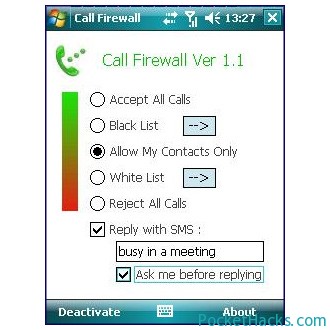
FEATURES & OPTIONS:
CallFirewall for Windows Mobile basically rejects unwanted calls.
* Accecpt all calls – pretty self explainatory
* Accept call from My Contacts only – accepts calls from contacts only, others are rejected
* Reject all calls – pretty self explainatory
* White List – accepts calls only from the white listed nos
* Black List – accepts all call except from the black listed nos f. Black List Pattern – any no STARTING from the black list pattern list is rejected. for eg. if you enter “123”, so all nos STARTING from “123” will be rejected this is a very nice option with which you can block nos from any particular network, country, city , area or whatever you can think of.
* There is also an option to reply with an SMS.

ı installed for htc hd2.
but it did not work.
I input one of my contacts to black list but it did not block it.even if ı choose block all calls it does not work..
ı hope u will guide me to have it worked.
I tried it out. it seen to be alright. U need a lit more direction for operation tho. I wish it was faster on the pickup.
Call BLocker works on my HTC HD2, but cannot make the SMS Blocker work
I need the set up any idea how I can download the setup for free
very good
thanks
It works 5/5 for me. Am currently running the software on HTC Touch Pro2 OS: WM6.5.
Thanks for the post really helpful and the sms filtering comes handy too.
Regards
Yep, it’s a great app for Windows Mobile devices 🙂